
How to brief a CAD animation.
Start with the question a buyer asks when they have the product in their hands. “Why does the wheel stop while the motor keeps turning?” gives an animator a shot to plan and your engineer a movement to check.
Download the brief (.txt)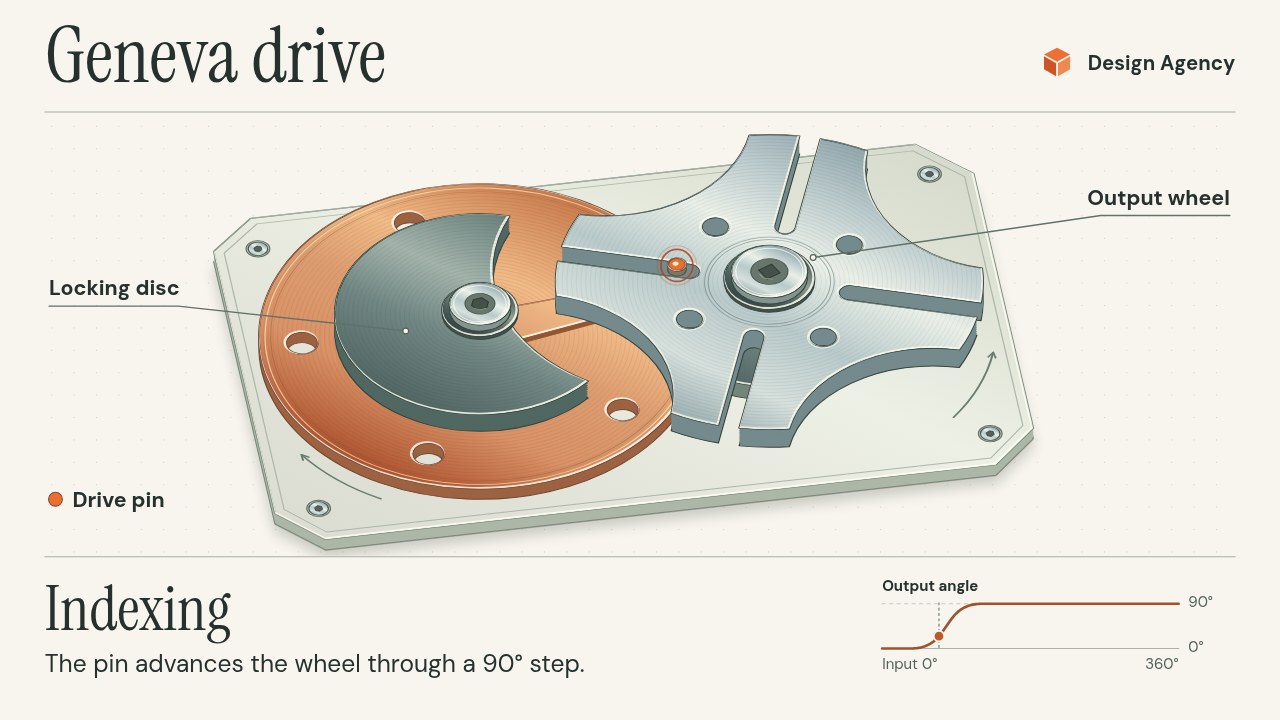
What should you send?
For an assembly, send a STEP export with the moving parts as separate bodies. Give the product revision, units and one known dimension so the studio can check scale. Mark the fixed part and the driving part on a screenshot. An export can preserve the shape while losing the constraints that describe how the parts move together.
If you have a drawing, mark the start and end positions on a PDF, or photograph a sketch with a dimension and an arrow. A section through a housing is particularly useful when the moving surfaces are hidden. Identify any dimensions or travel limits your engineer still needs to confirm so the quote can allow for modelling time.
Should the buyer watch or take control?
A film for a sales presentation
An MP4 gives every viewer the same sequence. In the 20-second Orbit studio film, an exploded view reveals the gearbox, then a face-on view shows four turns of the sun gear for one turn of the carrier. Give the animator the question each shot should answer. Watch the Orbit shot breakdown.
A control for a product page
In the Geneva example, the visitor can stop the pin exactly where it leaves the slot. A single angle control lets them inspect the dwell. A product with two distinct states might need only a switch, as in the studio’s open and closed check valve. Specify which control the visitor needs and where your team will embed the HTML demo.
What changes the cost?
Preparing the model
A clean assembly with named parts saves time spent identifying or rebuilding them. A single fused mesh can require reconstruction before an internal component can move independently. A list of the parts actually visible in the shot helps the studio decide how much of the assembly to prepare.
Setting up the motion and outputs
A ten-second cutaway with three timed movements can take more work than a longer, single-camera rotation. Identify section views, moving contacts, label changes and any pauses. A square social edit can require a new camera framing. Translated labels need space and checking. Ask for these as separate options if you only need the main film at launch.
The studio quotes animation individually. Its £100 service covers modelling one simple part from a fully dimensioned drawing. See the single-part CAD scope.
A worked scope for a four-station indexer
Buyer’s brief. “Our distributors need to show how one continuous input turn advances the wheel by a quarter turn. Use a fixed overhead view. Colour the driver orange and label the interval when the wheel holds. Deliver a silent, twelve-second widescreen MP4 for a slide deck. Quote an angle slider for the product page as a separate option.”
Engineering sign-off. At the motion proof, follow one revolution from pin entry to release. Check the direction, the 90° step and the stationary interval. At delivery, check that the video loops at the same crank position. For the HTML option, drag the control through that same cycle on the intended page.
What belongs in the written quote?
Ask for the agreed input file revision, sequence, duration and camera views. List each final file, its dimensions and its intended use. For a web demo, specify the controls, supported display sizes and who will install it. If you need editable project files, stills or use by distributors, ask for those terms in writing.
Agree the fixed price, delivery date, motion proof, feedback rounds and how changes after approval will be priced. Name the person who will sign off the mechanism. They can check the movement at the proof stage, before time goes into final rendering.
Fill in the plain-text quotation brief. Paste your answers into the quote form and attach the drawings you already have.
Request a fixed quote